


BGMI match analysis from video
Insite AI turns a BGMI match video into a replayable map of every squad's movement. Paste a YouTube link or upload the recording, and you get each squad's route, rotations, zone control and contacts, for your own team and for every opponent in the lobby.
What you need
For a step-by-step walkthrough, see how to run a BGMI match analysis.
A match video that shows the spectator map is enough. Tournament broadcasts and observer recordings both work.
- The spectator map on screen: the observer's overhead map or minimap, which is what Insite AI tracks.
- A YouTube link or a file: a public or unlisted YouTube video, or an MP4, MOV, MKV or WebM recording of up to 10 GB. A YouTube link skips the upload entirely, and an interrupted upload resumes where it stopped.
- Start and end times: up to 60 minutes, from the plane drop to the final circle.
- 720p or 1080p: higher quality gives the most accurate tracking of player names and movement.
- A supported map: Erangel, Miramar or Rondo.
- A sampling rate: how often a frame is read, from every 2 seconds for the most detail to every 10 seconds for a quick look. Every 3 seconds is the default.
The five views of a match
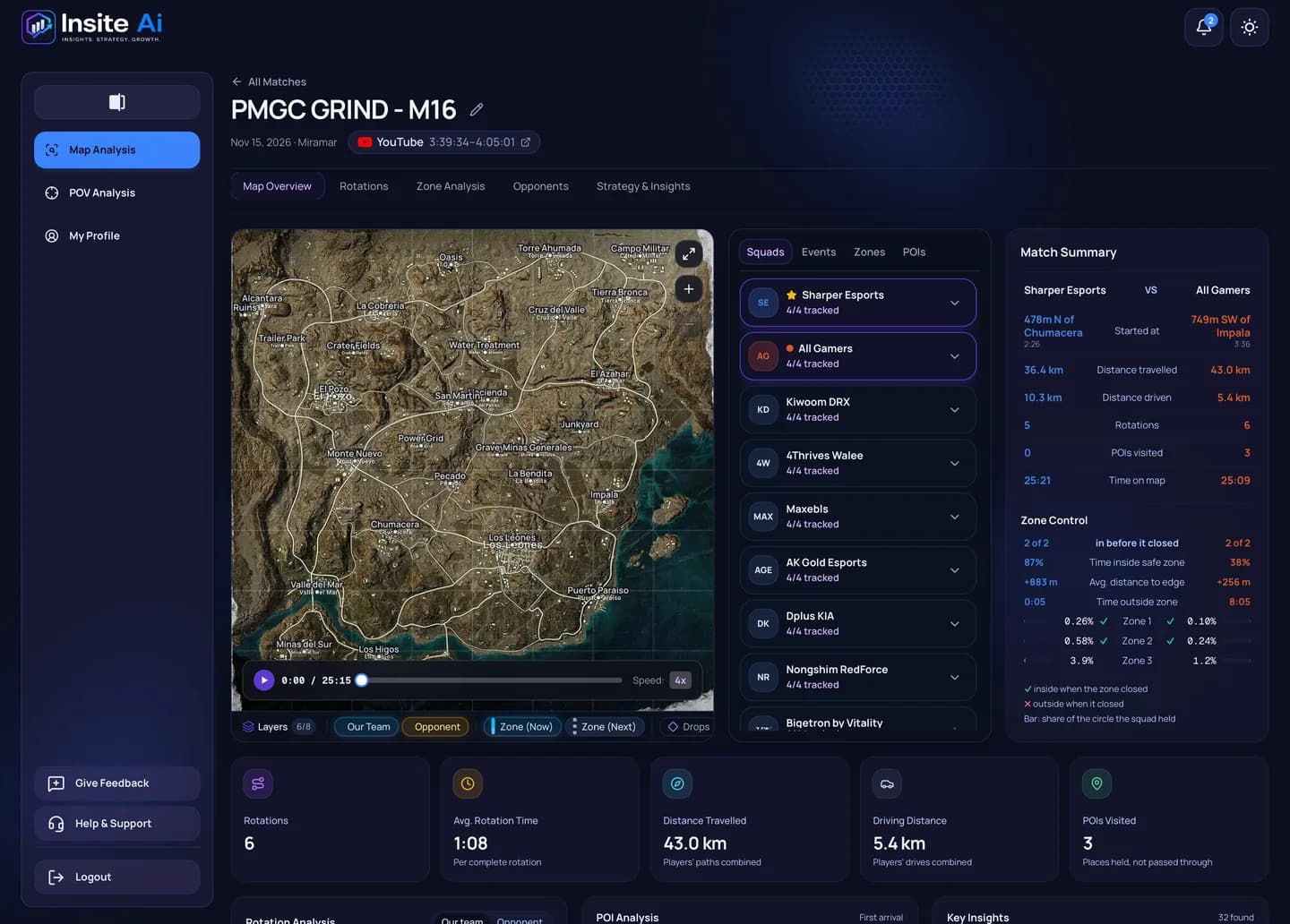
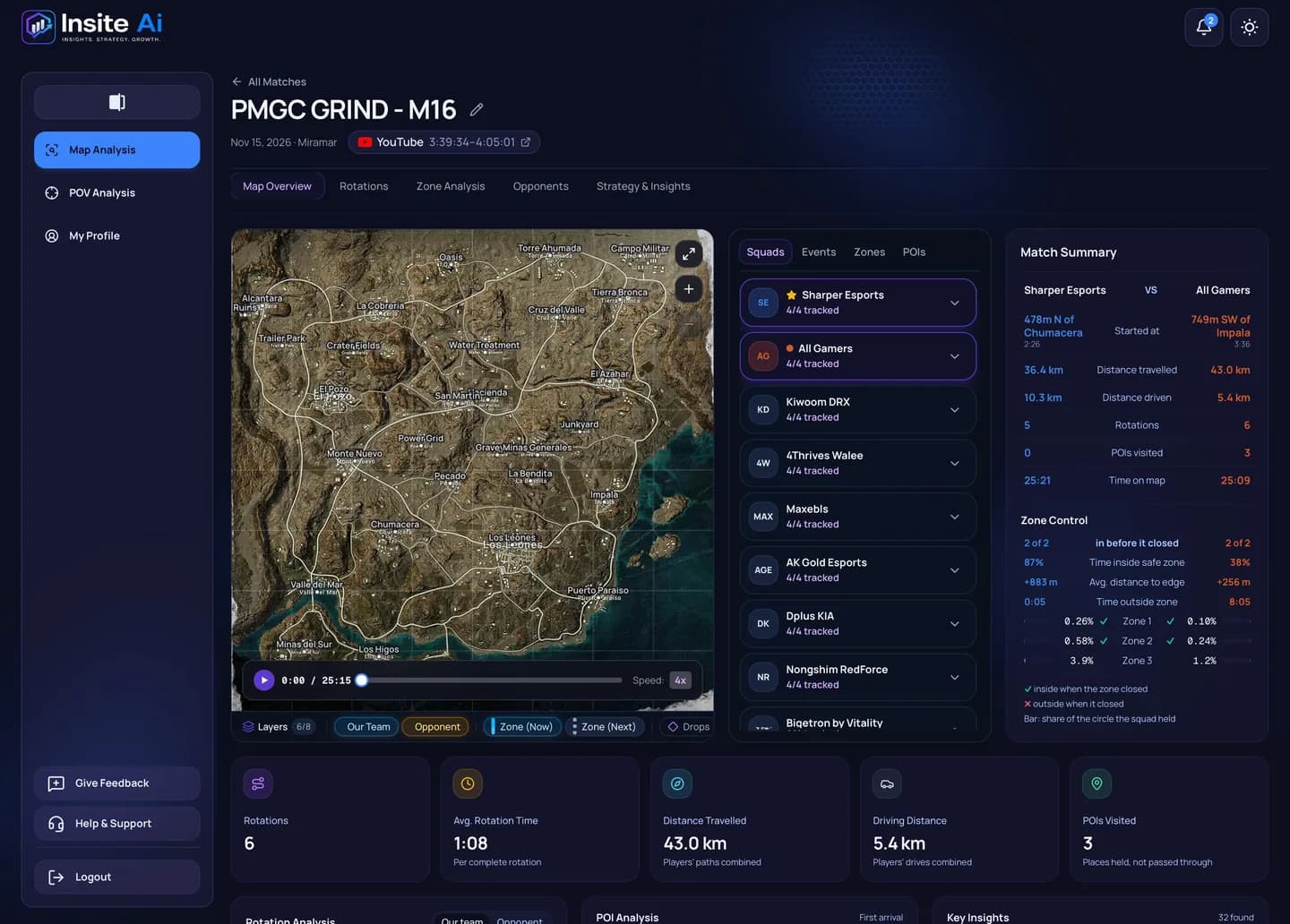
Each analysed match opens as a dashboard with five tabs.
Map overview
Replay the match on the map with a timeline and adjustable playback speed. You can switch these layers on and off:
- Your team's route and the opponent's route
- Points of interest: the named places on the map
- Drops: where each squad landed, or was first seen holding, with hot drops flagged
- Contacts and driving starts
- Last seen: each player's last sighting, which is not the same as being eliminated
- The current zone and the next zone
Rotations
Every rotation a squad made: where it went from and to, when it started and ended, and how far it went. A rotation is a move of at least 600 m between two holds, and a hold is the squad staying within about 150 m for at least 45 seconds. The tab also counts rotations and shows the average time a rotation took. A move the video cut off part way is marked partial and left out of the counts.
Zone analysis
Zone control is the share of zone phases in which a squad was already inside the safe circle when it closed. It counts only the phases in which that squad was on camera, so a squad is not penalised for time the broadcast did not show it.
For each zone phase, the tab also shows how much of the time the squad spent inside the safe circle, its distance to the edge of the play zone, and how soon it started rotating after the zone formed. Zones are read from the circles drawn on the broadcast map, so phases the broadcast did not show clearly are marked as not measured.
Opponents
Pick any squad in the lobby and compare it with yours. For each squad, Insite AI shows the distance travelled and driven, its rotations, the points of interest it visited, its contacts, and its time on the map.
Strategy insights
Automatic notes drawn from the tracking. For example, it flags a squad that was split, with one member more than 250 m from the rest, and how much of its time on screen that lasted.
What a contact means
A contact means two squads were within 150 m of each other for at least 10 seconds. It is based on positions only: it shows that two squads were close, not that they fought.
Limits
Insite AI states what the video can and cannot show, rather than guessing.
- Positions only: match analysis tracks movement. It does not read weapons, firing or the kill feed, so it shows no finishes or damage.
- Blue zone: the blue zone boundary is not detected. The safe zone and the next zone are.
- Late-game drift: positions can drift slightly when the observer zooms in.
- Missing data stays missing: when a value was not measured, the dashboard says it is not available instead of showing a zero.
How teams use it
- Scrim review: compare your rotation timing and zone control across a block of scrims, and find where the squad gets caught out.
- Opponent scouting: analyse a rival's tournament broadcasts to see where they drop, how they rotate and when they move into the zone.
- Coaching conversations: replay a single rotation on the map with the squad instead of describing it from memory.
Frequently asked questions
- Which BGMI maps does match analysis support?
- Erangel, Miramar and Rondo.
- Can I analyse a YouTube video?
- Yes. Paste a public or unlisted YouTube link. A livestream can be analysed once the broadcast has finished and the recording has processed.
- Does the video need the spectator map?
- Yes. Insite AI tracks squads from the observer's overhead map or minimap, so that map must be on screen in the video.
- Does match analysis read kills, weapons or damage?
- No. Match analysis tracks positions only, from the spectator map. It does not read weapons, damage or the kill feed, and placement appears only when the broadcast shows the standings.
- How long can the video be?
- Up to 60 minutes of gameplay. You set the start and end times so the analysis skips lobby time, countdowns and breaks.
- How long does an analysis take?
- About 8 to 17 minutes of processing for 30 minutes of video, scaled to the length you choose. You can leave the page; you get a notification when it is ready.
- Who can run and see match analyses?
- Founders, coaches and analysts can run match analysis. Each analysis is visible only to the person who created it.
- What happens to the video I upload?
- Uploaded videos are deleted after 7 days. The analysis results stay until you delete the analysis.
- How is usage counted?
- In minutes of video per organisation per month, shared by everyone in it. Failed and cancelled analyses do not count, so choosing a shorter stretch of video uses fewer minutes.
Related
- BGMI team analytics for esports teamsBGMI team analytics from match video: every squad’s route, rotations, zone control, drops and contacts, for coaches, analysts and esports team founders.
- How to run a BGMI match analysisStep by step: analyse a BGMI match video in Insite AI. Pick the video and minutes, choose the map and sampling, follow processing, and fix common failures.
- What is a rotation in BGMI?A rotation in BGMI is a squad’s move from one position to the next, usually to stay ahead of the zone. Learn how rotations are tracked and analysed.
See your own matches in Insite AI
Start on the free plan, or book a 1-on-1 demo and we'll walk you through it.
Last updated