



BGMI team analytics for esports teams
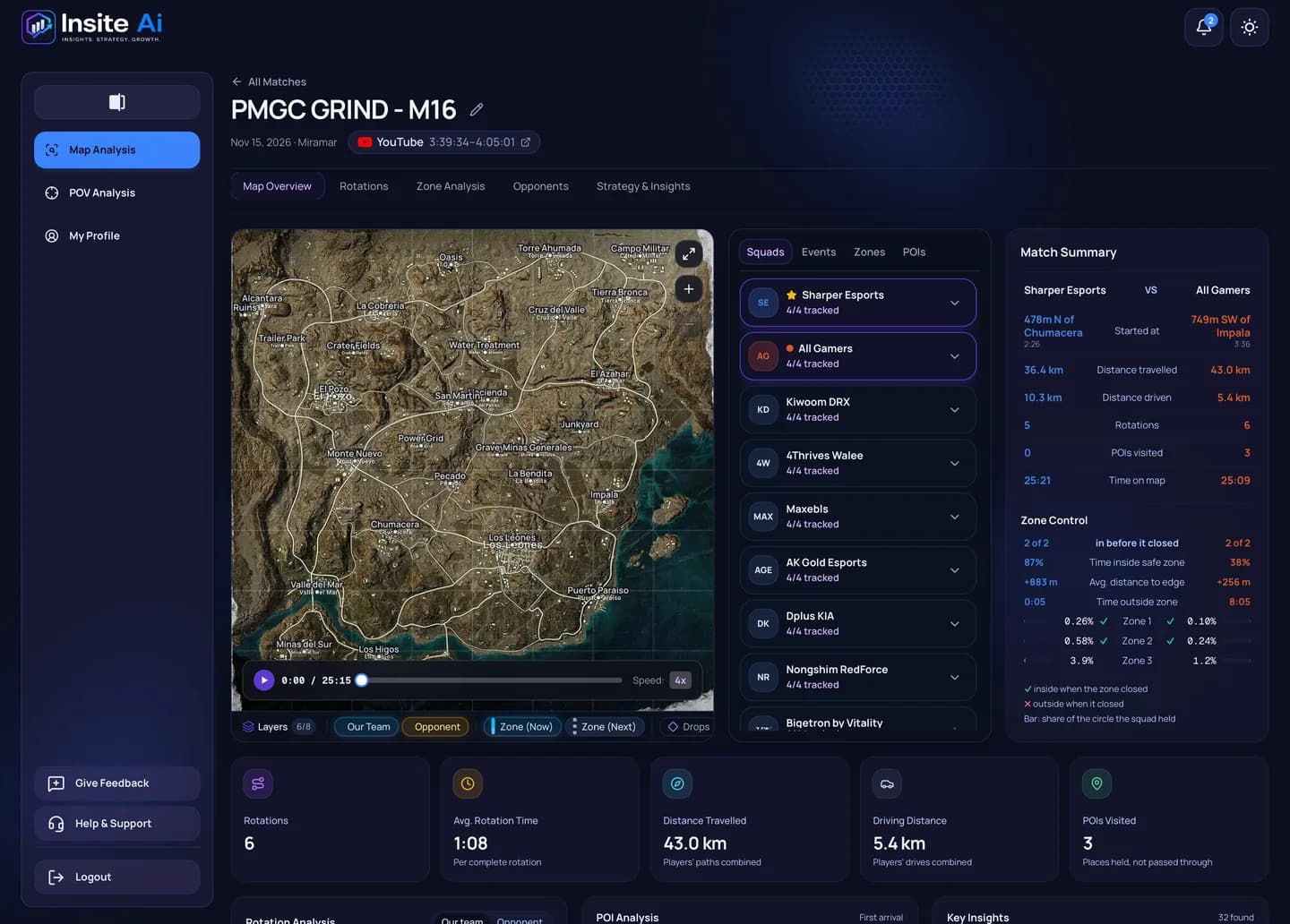
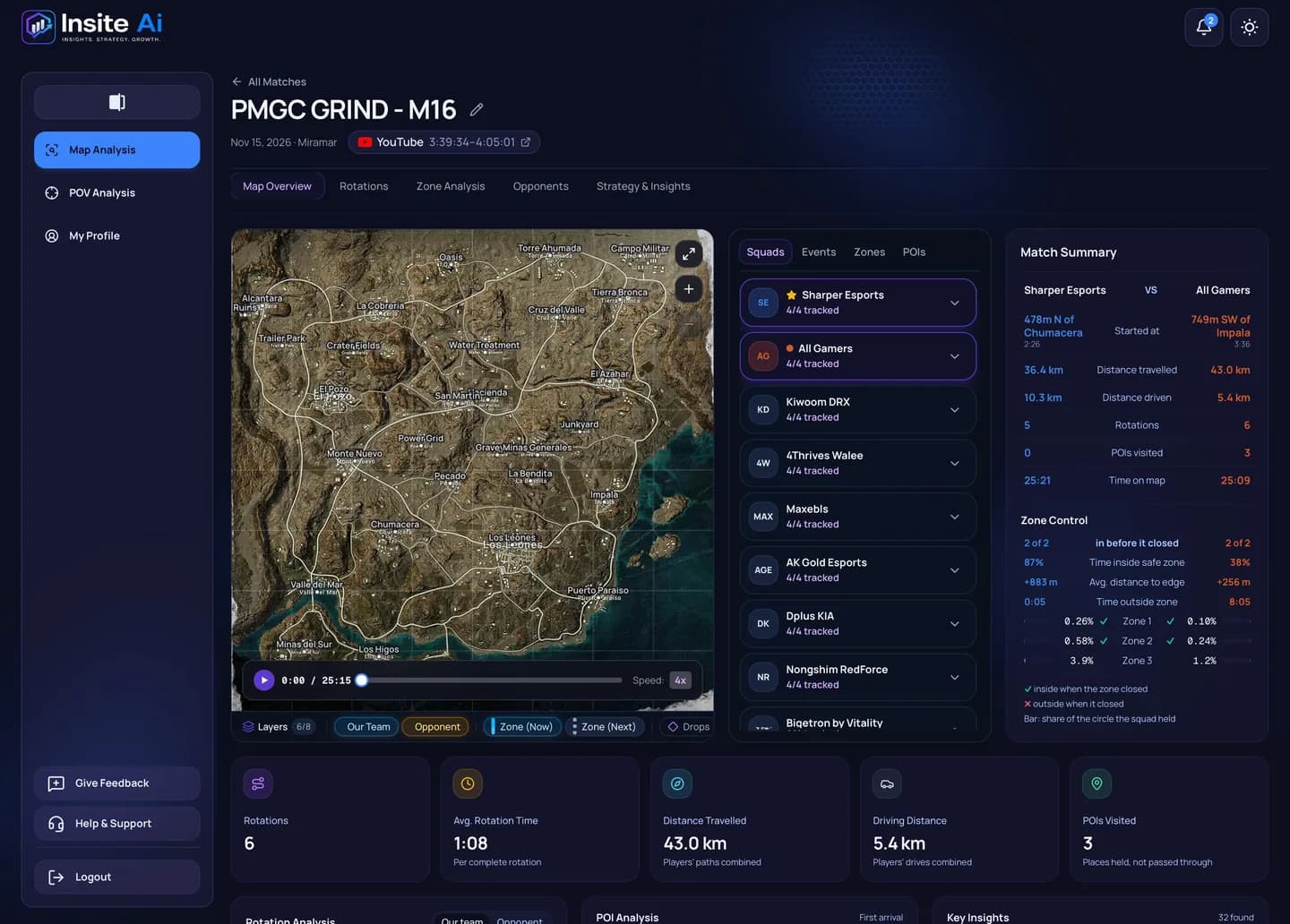
Insite AI is a BGMI team analytics platform for esports teams. Give it a match video that shows the spectator map, and it tracks every squad in the lobby: where each one dropped, how it rotated, whether it was inside the safe zone in time, and when it came into contact with other squads. Coaches and analysts can see why a match was won or lost instead of reconstructing it from memory.
What Insite AI measures in a BGMI match
Every analysed match gives you these numbers for your squad and for every other squad in the lobby, compared with the lobby median.
| Metric | What it tells you |
|---|---|
| Drop | Where each squad landed, with contested and hot drops flagged when two or more squads landed together. |
| Rotations | Every move of 600 m or more between held positions, and the average time a rotation took. |
| Zone control | The share of zone phases in which the squad was already inside the safe circle when it closed. |
| Contacts | Moments when members of two squads were within 150 m for 10 seconds or more, plus third parties. |
| POIs visited | The named places each squad held, and when it first arrived. |
| Distance and driving | How far each squad travelled, and how much of it was driven. |
| Squad split | How often a member was 250 m or more from the rest of the squad. |
Each term is explained, with examples, in the BGMI glossary.
How it works
- Pick a match video with the spectator map on screen: a YouTube link or a file.
- Choose the minutes, the map and the sampling rate. Erangel, Miramar and Rondo are supported.
- Insite AI tracks every squad, reading player name tags from the spectator map frame by frame.
- Open the match dashboard, with a replay of every route and tabs for rotations, zone analysis, opponents and strategy insights.
See how to run a BGMI match analysis for the full walkthrough.
What teams use it for
- Scrim review: compare your rotation timing and zone control across a block of scrims, and find the matches where the squad was caught out.
- Opponent scouting: analyse rivals' tournament broadcasts to see where they drop, how they rotate and when they move into the zone.
- Coaching conversations: replay a single rotation on the map with the squad instead of describing it from memory.
Who it is for
- Coaches reviewing scrims and tournament matches, and finding where rotations or zone timing go wrong.
- Analysts comparing squads across the lobby with numbers instead of notes.
- Founders who want to see how their teams play, match by match.
What it does not measure
Match analysis tracks positions from the spectator map. It does not read weapons, damage or the kill feed, so a contact shows two squads were close, not that they fought. Read more about the limits in BGMI match analysis from video.
Frequently asked questions
- Which games does Insite AI support?
- BGMI. Match analysis from video supports Erangel, Miramar and Rondo.
- What do we need to analyse a match?
- A video of the match that shows the spectator map: a public or unlisted YouTube link, or an MP4, MOV, MKV or WebM file. Tournament broadcasts and observer recordings both work.
- Who on the team can use it?
- Founders, coaches and analysts can run match analysis.
- Is there a free plan?
- Yes. Insite AI has a free plan and paid plans. Plans differ in how many minutes of match video you can analyse each month, and in team members and features. Book a demo if you want help choosing a plan.
- Who can see our team's analyses?
- Your data is private to your organisation, and each match analysis is visible only to the person who ran it. Uploaded videos are deleted after 7 days; the results stay until you delete them.
Related
- BGMI match analysis from videoTurn a BGMI match video into every squad's route, rotations, zone control and contacts. Paste a YouTube link or upload an MP4, MOV, MKV or WebM file.
- How to run a BGMI match analysisStep by step: analyse a BGMI match video in Insite AI. Pick the video and minutes, choose the map and sampling, follow processing, and fix common failures.
- What is a rotation in BGMI?A rotation in BGMI is a squad’s move from one position to the next, usually to stay ahead of the zone. Learn how rotations are tracked and analysed.
See your own matches in Insite AI
Start on the free plan, or book a 1-on-1 demo and we'll walk you through it.
Last updated